
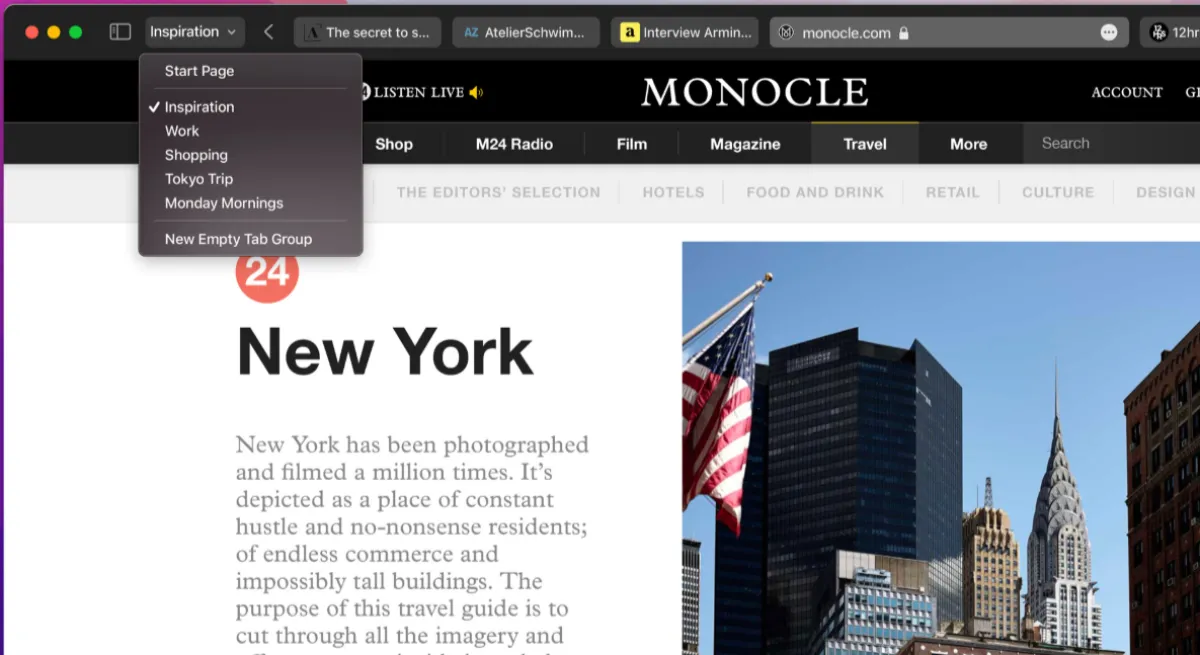
If you’re someone who constantly ends up with 30 or 40 tabs open in Safari, Apple may finally have a solution for you. Recent reports suggest that Safari is working on a smarter way to manage tabs by automatically organizing them into groups.
The feature aims to reduce clutter, improve productivity, and make browsing much easier for users on both Mac and iPhone.
What Is Safari’s Automatic Tab Grouping Feature?
Safari already allows users to create Tab Groups manually, but the new feature could take things a step further by using intelligent automation.
Instead of dragging tabs into groups yourself, Safari may detect related tabs and organize them automatically. For example:
Shopping websites could go into one group
Work-related tabs could be separated automatically
Travel bookings and hotel pages could be grouped together
Social media tabs may appear in their own category
This could save users a huge amount of time, especially those who multitask throughout the day.
Why This Feature Matters
Modern web browsing has become chaotic. Many people keep dozens of tabs open because they fear losing important information.
Automatic tab grouping can help by:
Better Productivity
Users can quickly switch between different tasks without searching through endless tabs.
Cleaner Browsing Experience
A more organized browser means less stress and distraction.
Easier Navigation on Mobile
Managing tabs on iPhones can sometimes feel difficult. Smart grouping could make mobile browsing much smoother.
Smarter Workflow
Students, office workers, researchers, and content creators may benefit the most from this feature.
How Safari Could Use AI for This
Apple has been slowly adding more intelligent features across its ecosystem, and Safari’s new tab management system may rely on machine learning.
The browser could analyze:
- Website categories
- Search topics
- User behavior
- Frequently visited pages
Then it may automatically place related tabs together without needing manual input.
Apple is also focusing heavily on privacy, so any AI processing would likely happen directly on the device rather than through cloud servers.
Safari vs Google Chrome
Google Chrome already offers tab grouping features, but Safari’s approach may feel more seamless for Apple users.
Here’s a quick comparison:
| Feature | Safari | Chrome |
|---|---|---|
| Manual Tab Groups | Yes | Yes |
| Automatic Smart Grouping | Expected | Limited |
| Privacy Focus | Strong | Moderate |
| Apple Ecosystem Integration | Excellent | Basic |
Safari’s biggest advantage remains its deep integration with macOS and iOS.
When Will the Feature Launch?
Apple has not officially confirmed a release date yet. However, industry insiders believe the feature could appear in future Safari updates connected to upcoming macOS and iOS releases.
Beta testers may see the feature first before it rolls out publicly.
Final Thoughts
Safari’s automatic tab grouping could become one of the most useful browser features for everyday users. With people spending more time online than ever before, smarter tab management feels like a natural next step.
If Apple implements the feature properly, Safari users may finally be able to enjoy a cleaner and more organized browsing experience without extra effort.
For anyone tired of tab overload, this update could be a game changer.